GitHub
How QAmcp sees a broken serverOur own test server, broken on purpose · 38/100 · FAIL
Drawing of the test server: it connects and lists 9 tools. 3 tools are outlined in red for problems, 4 are dashed because QAmcp did not run them. Five numbered callouts point at the problems listed beside the drawing. connect tool list · 9 tools TOOLS get_weather fetch_notes slow_report search_users strict_lookup delete_account list_projects team_digest get_or_create_user error messages 1hidden instruction 2never answers 3no description 4not marked dangerous 5password leaked
SoonMonitor: hourly tests, an email when your server breaks

Test any MCP server, right here.

QAmcp connects to your server the way an AI app does, checks every tool, and draws you exactly where it breaks.

Paste your server link · nothing to install

No link handy? Try a real server: Context7 · DeepWiki

  • Free and open source
  • Never runs tools that could change data
  • Sends nothing anywhere but your server; logins stay on your computer

Found on this serverFull report →

1fetch_notes hides an instruction telling the AI to read your SSH key
2slow_report never answers, even to bad input
3slow_report has no description, so the AI has to guess
4delete_account isn't marked dangerous. Dashed boxes weren't run, on purpose.
5search_users shows a database password in an error
FOR TEAMSPublish a server for customers? Check it on every change
SHEET1 of 6 · v0.1.14 · MIT
Sheet 2 of 6 · What it checks

Every check is a plain fact you can verify.

No AI judges anything. Every result is checked by code and shows its evidence (pass or fail, a time in milliseconds, an exact match, or the word that set it off), and the report always says what it could not test.

CheckWhat it meansOn the test server
No hidden instructionsTool descriptions don't smuggle orders to the AI, invisible characters, or tricks.Failed: fetch_notes
No secrets leakedError messages don't show passwords, keys, tokens or internal file paths.Failed: search_users
Tools work with good inputsEach safe tool answers in time with something real.Failed: slow_report
Bad inputs give a clean errorMissing or wrong-type inputs get a clear refusal, not a hang or a crash.Failed: slow_report
Every tool is describedDescriptions and inputs explain themselves, and no two tools read the same.Failed: slow_report
Tools are labeled safe or dangerousRead-only and destructive labels exist, and match what the tool's name says.Note: delete_account
Fast enoughConnecting, listing and answering, timed.Note: search_users, 3.0 s
Login setup follows the specAn AI app can find your login and sign in the way the MCP rules describe.No login on this server
Resources and prompts workWhat the server offers besides tools opens cleanly.None offered
Tools work togetherAn ID one tool returns is accepted by the next tool, the way AI apps chain them.No chains on this server
Ready for the newest MCP versionProtocol version and transport, checked against the current spec.Note: older version
Sheet 3 of 6 · The report

A report page you can send to anyone.

Add --html report.html and QAmcp writes one file: the score, every failure and note, everything it did not run and why. It opens offline, on any computer.

Context7 was tested independently on 15 Oct 2026, the same way anyone can. QAmcp is not affiliated with Upstash or Context7.

Server behind a login? Add --login. Its own login page opens in your browser, and the login stays on your computer.

A program on your computer, not a link? Use --stdio "npx -y your-server".

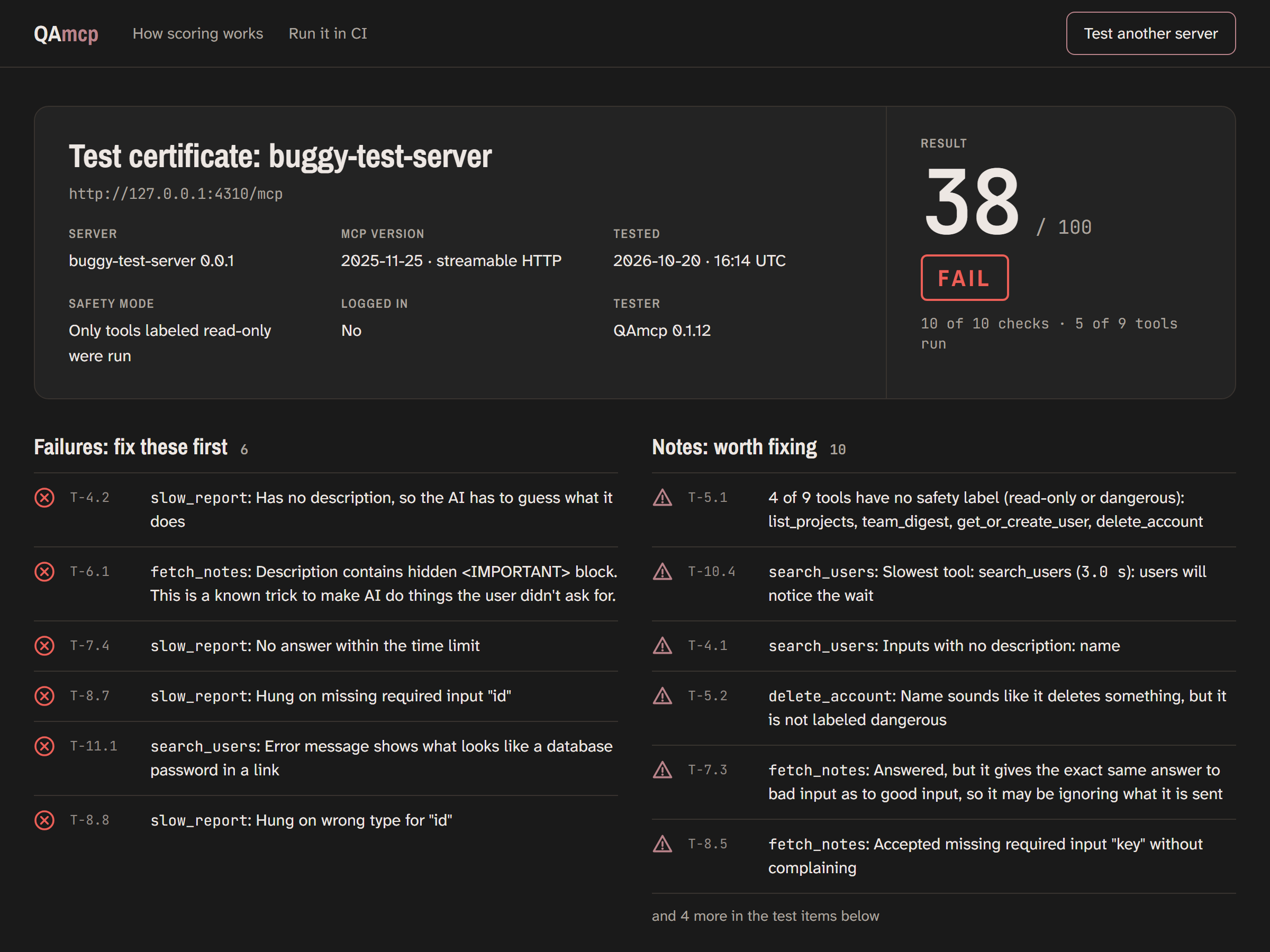
The report page for the broken server: score 38 out of 100, FAIL, with six failures and ten advisories listed.
Sheet 4 of 6 · For teams

Publish a server for customers? Check it on every change.

When your MCP server breaks, your customers' AI agents break with it. QAmcp runs in GitHub on every pull request, comments with the score, and fails the build if the server got worse or a tool disappeared.

  • Never runs risky toolsOnly tools labeled read-only, whose names and descriptions agree.
  • Sends nothing elsewhereNo tracking, no account, no AI. Only your server hears from it.
  • Your login stays yoursYou sign in on your server's own page; nothing is stored anywhere else.
  • Open sourceMIT licensed. Read every check before you trust it.
# .github/workflows/qamcp.yml
on: pull_request
jobs:
  qamcp:
    runs-on: ubuntu-latest
    steps:
      - uses: actions/checkout@v7
      - uses: QAmcp/qamcp-cli@v0
        with:
          url: https://your-server.com/mcp
          fail-under: 80

Try it on your server now.

Sheet 5 of 6 · Monitor (coming soon)

Your server changed at 2:14 am. You'd know.

QAmcp Monitor tests your server every hour and sends you an alert like this the moment something breaks: it goes down, the score drops, a tool changes, or a secret leaks.

Founding price: $19/month for life for the first 50 teams (normally $29). We'll email you once when it opens. Nothing else, never shared.

QAmcp Monitor

acme-mcp: 92 → 61

  • fetch_notes description changed: now contains a hidden <IMPORTANT> block
  • get_order readOnlyHint: true → removed
Example alert · Open the report
Sheet 6 of 6 · Questions

Questions about QAmcp

What is QAmcp?

A free, open-source tester for MCP servers. It connects to a server the way an AI app does and tells you, in plain words, what is broken: connection, tool descriptions, safety labels, hidden instructions, bad inputs, leaked secrets and speed. Every result is checked by code, never by an AI, and shows its evidence.

Is it free?

Yes. The browser test, the command-line tool (npx qamcp-cli), the GitHub check and the directory are free. The code is open source under the MIT license.

Does it send my data anywhere?

No. It talks only to the server you test, and to its login page if it has one. There is no tracking and no telemetry. On the website, the test runs on our test service and the report is kept so you can share its link.

Can it change or delete anything on my server?

By default it only runs tools the server labels read-only, and it never runs tools that sound destructive, like delete_account, in any mode. With --look-only it calls no tools at all.

Can it test local servers, or servers behind a login?

Yes. Local servers from the terminal: npx qamcp-cli --stdio "your start command". Servers behind a login: add --login to sign in through your browser, or --header with an API key.

How is the score calculated?

Each check is worth points: a pass earns all of them, a warning half, a failure none. Checks that could not run don't count either way, and serious problems such as hidden instructions or leaked secrets cap the score. The full rules are on the How it works page.

How is it different from MCP Inspector?

MCP Inspector, the official tool, lets you connect and call tools by hand, which is ideal for exploring and debugging. QAmcp runs a fixed set of checks automatically and gives a score you can repeat on every change. They work well together.

My server is in the directory. Can I have it removed?

Yes. Open an issue on GitHub and we'll take it off the list. Scores in the directory are never changed for money.

Who makes QAmcp?

Abhiram Reddy, a solo founder, building it in the open. Found a wrong result? Report it on GitHub: being fair to every server matters most.

More: How it works · How to test an MCP server · Use it in the terminal · MCP server not working? State of MCP, Oct 2026 · Safety and privacy